

สร้างบล็อกแบบกำหนดเองด้วย PHP เพียงอย่างเดียว บอกลาชอร์ตโค้ดแบบเก่า 🥳

การสร้าง Gutenberg blocks จำเป็นต้องใช้ React, Node.js และ build pipeline มาตั้งแต่ WordPress 5.0 แนะนำ block editor สำหรับผู้ที่เชี่ยวชาญด้าน PHP — เหมือนกับผมและนักพัฒนา WordPress ส่วนใหญ่ — อุปสรรคนั้นได้ขวางกั้นการเข้าร่วมมาเกือบสิบปี WordPress 7.0 เปลี่ยนสิ่งนี้ PHP-only blocks ให้คุณลงทะเบียน Gutenberg block ที่ทำงานได้อย่างสมบูรณ์ด้วยไฟล์ PHP เพียงไฟล์เดียวและ flag autoRegister
คุณเขียน PHP คุณได้บล็อก ไม่ต้องมี tooling ไม่ต้อง build 🥳 ในบทความนี้คุณจะได้เรียนรู้วิธีการทำงานของ PHP-only blocks และดูตัวอย่างการใช้งานจริงที่แทนที่ shortcode แบบคลาสสิกด้วยบล็อกที่เทียบเท่า
PHP-Only Blocks คืออะไร?
จนถึงขณะนี้ การสร้าง Gutenberg block แบบกำหนดเองหมายความว่าต้องตั้งค่า JavaScript toolchain: npm install, ไฟล์ block.json, ขั้นตอน build ด้วย webpack.config.js หรือ @wordpress/scripts และ component edit.js ที่เขียนด้วย JSX ทุกการเปลี่ยนแปลงต้องมีขั้นตอน compile ก่อนที่คุณจะเห็นผลใน editor สำหรับนักพัฒนา PHP ที่เพียงต้องการลงทะเบียน display block แบบง่าย overhead นั้นรู้สึกไม่สมส่วนกับงานมาตลอด
PHP-only blocks ตัดทุกอย่างนั้นออก ตอนนี้ใน register_block_type() คุณเพียงแค่ต้องส่ง 'autoRegister' => true และ WordPress จัดการทุกอย่างในฝั่ง JavaScript โดยอัตโนมัติโดยใช้ ServerSideRender บล็อกปรากฏใน inserter แสดง live preview บน canvas และสร้าง Inspector Controls ใน sidebar — ทั้งหมดนี้โดยไม่ต้องเขียน JavaScript แม้แต่บรรทัดเดียว
Controls ถูกสร้างอัตโนมัติตามประเภทของ attribute:
| ประเภท Attribute | Inspector Control ที่สร้าง |
|---|---|
string | Text input |
integer / number | Number input |
boolean | Toggle |
string + enum | Dropdown select |
Controls ที่สร้างอัตโนมัติครอบคลุมเพียงสี่ประเภทข้างต้นในขณะนี้ สิ่งที่ซับซ้อนกว่าเช่น image picker, media upload หรือ nested data ยังไม่รองรับและจะต้องใช้บล็อกที่ลงทะเบียนด้วย JavaScript นักพัฒนายังสามารถทำเครื่องหมาย attribute แต่ละรายการด้วย role local เพื่อระบุว่าเป็น internal state WordPress จะข้ามรายการเหล่านั้นเมื่อสร้าง sidebar controls
PHP-only blocks พร้อมใช้งานใน WordPress 7.0 โดยไม่ต้องมี dependencies เพิ่มเติม อ่านเพิ่มเติมได้ในบันทึก dev note อย่างเป็นทางการบน Make WordPress Core
เหมาะสำหรับใคร?
เอเจนซีขนาดเล็กและฟรีแลนซ์ที่ไม่มีความเชี่ยวชาญ JavaScript เชิงลึกสามารถสร้าง block editor solutions ที่ใช้ฟีเจอร์ WordPress แบบเนทีฟได้อย่างเต็มที่โดยไม่ต้องแตะ build pipeline หากคุณต้องการส่งมอบ Gutenberg blocks แบบกำหนดเองสำหรับธีม เช่น author box, pull quote, testimonial, CTA banner, notice และ element ที่คล้ายกัน แทนที่จะพึ่งพา shortcode PHP-only blocks จะช่วยลดอุปสรรคนั้นได้อย่างมาก
เป็นทางเลือกที่ไม่แทนที่บล็อกที่ลงทะเบียนด้วย JavaScript เมื่อคุณต้องการ inline rich-text editing, reactive UI แบบ real-time หรือ inner block nesting — แต่สำหรับ structured display blocks ประเภทใหญ่ เป็นตัวเลือกที่เหมาะสมที่สุด
วิธีเก่า: Shortcodes
ก่อน PHP-only blocks แนวทางของนักพัฒนา PHP ในทางปฏิบัติคือ shortcode นี่คือตัวอย่าง testimonial shortcode แบบง่ายที่มีสาม attribute: ชื่อผู้เขียน บริษัท คะแนนดาว และ inner content สำหรับข้อความรีวิว:
function testimonial_shortcode( $atts, $content = '' ) {
$atts = shortcode_atts( [
'name' => '',
'company' => '',
'stars' => 5,
], $atts );
$stars_count = max( 1, min( 5, intval( $atts['stars'] ) ) );
$stars_html = str_repeat( '★', $stars_count )
. str_repeat( '☆', 5 - $stars_count );
return sprintf(
'<blockquote class="testimonial">
<p class="testimonial__stars">%s</p>
<p class="testimonial__body">%s</p>
<footer class="testimonial__attribution">
<strong>%s</strong>%s
</footer>
</blockquote>',
esc_html( $stars_html ),
wp_kses_post( $content ),
esc_html( $atts['name'] ),
$atts['company'] ? ', ' . esc_html( $atts['company'] ) : ''
);
}
add_shortcode( 'testimonial', 'testimonial_shortcode' );การใช้งาน:
[testimonial name="Sarah K." company="Acme Corp" stars="4"]
Saved us hours every week.
[/testimonial]มันทำงานได้... แต่มันก็แค่ shortcode 🤷🏻♂️
นี่คือปัญหาบางส่วนของ shortcodes:
- มองไม่เห็นใน editor. ผู้เขียนเห็น
[testimonial name="Sarah K." ...]ใน editor ไม่ใช่การ์ดที่ render แล้ว ไม่มี preview - ค้นหาไม่พบ. คุณต้องรู้ว่า shortcode นั้นมีอยู่และจำชื่อ parameter ได้ ไม่มีอะไรแสดงใน UI
- ไม่มี native styling controls. การปรับสี ระยะห่าง หรือ typography ต้องใช้ custom CSS หรือ attribute เพิ่มเติมที่ต้องเชื่อมต่อด้วยตนเอง
- Inner content ไม่ใช่ rich text. ข้อความรีวิวถูกส่งผ่านเป็น plain string ใน
$content— ไม่ใช่ rich text area ที่แก้ไขได้
Shortcodes เป็นเครื่องมือที่เหมาะสมในยุคของมัน Block editor มีสิ่งที่ดีกว่า แต่การใช้ประโยชน์จากมันเป็นเรื่องยาก WordPress 7.0 มอบทางลัดในรูปแบบของ PHP-only blocks
เพื่อความชัดเจน: วิธีที่ถูกต้องในการสร้าง Gutenberg block ยังคงเป็นบล็อกที่ลงทะเบียนด้วย JavaScript พร้อม edit component ครบถ้วน PHP-only blocks คือเส้นทางที่ง่ายกว่า — จำกัดอย่างตั้งใจสำหรับ server-rendered blocks ที่ไม่ต้องการการแก้ไขแบบ rich ใน canvas ไม่ใช่การแทนที่บล็อก JavaScript แต่เป็นตัวเลือกใหม่สำหรับกรณีใช้งานที่เรียบง่ายซึ่ง overhead ของ build pipeline และ React components ไม่คุ้มค่า
ตัวเลือกที่เรียบง่ายกว่า: PHP-Only Blocks
มาสร้าง testimonial เดิมเป็น WordPress custom block ด้วย PHP เพียงอย่างเดียว สูตร: register_block_type() ที่มี 'autoRegister' => true ใน supports บวกกับ render_callback
นี่คือโค้ดครบถ้วนสำหรับบล็อก:
function my_plugin_register_testimonial_block() {
register_block_type(
'my-plugin/testimonial', // Block name: namespace/slug
array(
'title' => 'Testimonial', // Shown in the block inserter
'attributes' => array(
// string attributes generate a text input in the sidebar
'name' => array(
'type' => 'string',
'default' => '',
),
'company' => array(
'type' => 'string',
'default' => '',
),
// integer attributes generate a number input
'stars' => array(
'type' => 'integer',
'default' => 5,
),
'body' => array(
'type' => 'string',
'default' => '',
),
),
// render_callback is the PHP function that outputs the block's HTML
'render_callback' => function ( $attributes ) {
$stars_count = max( 1, min( 5, intval( $attributes['stars'] ) ) );
$stars_html = str_repeat( '★', $stars_count )
. str_repeat( '☆', 5 - $stars_count );
// Translatable string for screen readers — standard WordPress i18n, nothing extra needed
/* translators: %d: star rating out of 5 */
$stars_label = sprintf( __( '%d out of 5 stars', 'my-plugin' ), $stars_count );
return sprintf(
'<blockquote %s>
<p class="testimonial__stars" aria-label="%s">%s</p>
<p class="testimonial__body">%s</p>
<cite class="testimonial__attribution">
<strong>%s</strong>%s
</cite>
</blockquote>',
// Merges your class with editor-added colour, spacing, and typography styles
get_block_wrapper_attributes( array( 'class' => 'testimonial wp-block-quote' ) ),
esc_attr( $stars_label ),
esc_html( $stars_html ),
wp_kses_post( $attributes['body'] ),
esc_html( $attributes['name'] ),
$attributes['company'] ? ', ' . esc_html( $attributes['company'] ) : ''
);
},
'supports' => array(
// The key flag — tells WordPress to handle JS registration automatically
'autoRegister' => true,
// The rest unlock native colour, typography, and spacing panels in the sidebar
'color' => array(
'background' => true,
'text' => true,
),
'typography' => array(
'fontSize' => true,
),
'spacing' => array(
'padding' => true,
'margin' => true,
),
),
)
);
}
add_action( 'init', 'my_plugin_register_testimonial_block' );ผลลัพธ์:
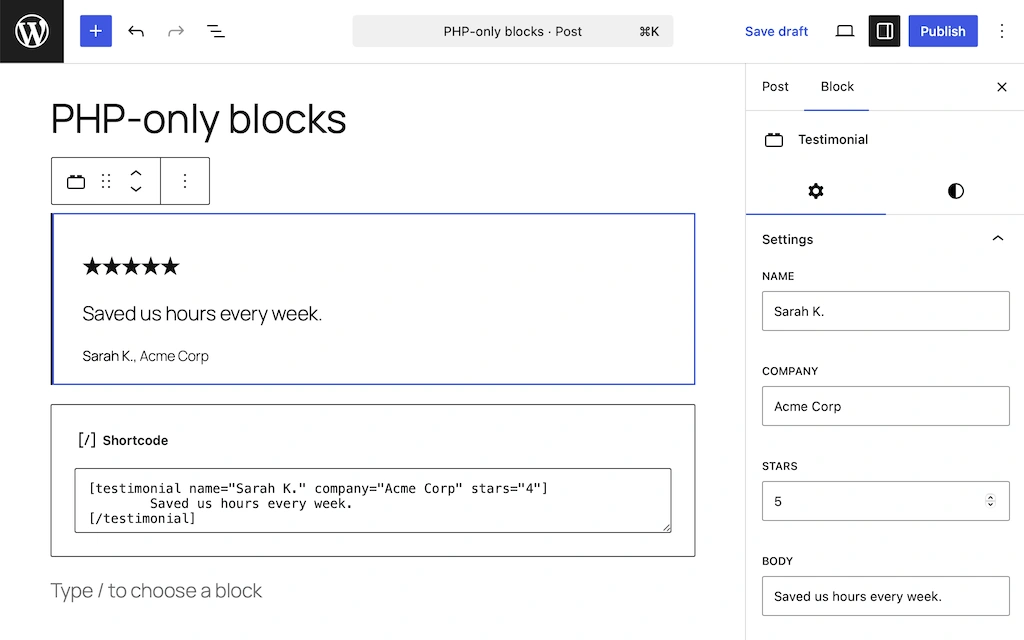
มีหลายสิ่งที่ควรสังเกต ประการแรก inner content ของ shortcode ไม่มีสิ่งที่เทียบเท่าโดยตรงใน PHP-only blocks ข้อความรีวิวกลายเป็น string attribute ที่แก้ไขได้จาก sidebar Inspector Controls — เป็น text field บรรทัดเดียว ไม่ใช่ rich text area ที่แก้ไขได้บน canvas สำหรับ testimonial quote สั้นๆ นี้เพียงพอ สำหรับข้อความที่ยาวกว่า คุณจะต้องการบล็อกที่ลงทะเบียนด้วย JavaScript พร้อม RichText component
ประการที่สอง get_block_wrapper_attributes() รวม class ของคุณกับสิ่งที่ editor เพิ่มสำหรับสี typography และ spacing — ดังนั้น native style panels จึงทำงานได้โดยไม่ต้องเชื่อมต่อ CSS เพิ่มเติม render_callback ได้รับ array $attributes ที่มีเฉพาะค่าที่ผู้ใช้ตั้งไว้ ไม่มี parameter $content เพราะ inner content ไม่รองรับ
สิ่งที่คุณได้รับเหนือกว่าเวอร์ชัน shortcode:
- Live preview บน editor canvas. ไม่ต้องมี shortcode syntax ดิบๆ อีกต่อไป — ผู้เขียนเห็น testimonial card ที่ render แล้วขณะแก้ไข
- Controls ที่สร้างอัตโนมัติ. Name, company, body (text input) และ stars (number input) ปรากฏโดยอัตโนมัติใน sidebar Inspector Controls
- Native colour, font และ spacing panels. มาจาก
supports— ไม่ต้องการ custom CSS - ค้นหาพบได้. บล็อกปรากฏใน inserter ด้วยชื่อและไอคอน
พร้อมสำหรับการแปลตั้งแต่เริ่มต้น
มีข้อกังวลด้านการแปลสองประการที่แตกต่างกันเมื่อทำงานกับ PHP-only blocks และควรชัดเจนว่าอันไหนคืออันไหน
ประการแรกคือ static strings ที่ฝังอยู่ใน PHP template ของคุณ — labels, button text, UI copy เหล่านี้จัดการด้วย __() และ _e() เช่นเดียวกับใน WordPress PHP file ทั่วไป ในบล็อกข้างต้น stars label เป็นตัวอย่าง:
/* translators: %d: star rating out of 5 */
$stars_label = sprintf( __( '%d out of 5 stars', 'my-plugin' ), $stars_count );WordPress tooling มาตรฐานตรวจจับสิ่งเหล่านี้โดยอัตโนมัติ ไม่ต้องมีการตั้งค่าเพิ่มเติม
ข้อกังวลประการที่สองคือเนื้อหาที่ผู้ใช้กรอกซึ่งเก็บไว้เป็น block attributes — testimonial body, ชื่อผู้รีวิว, บริษัท นี่คือเนื้อหาที่ editor ของคุณพิมพ์เข้าไปในบล็อกจริงๆ และ __() ไม่ได้แตะต้องมัน ในไซต์หลายภาษา ค่า attribute เหล่านี้ต้องได้รับการแปลเป็นแต่ละภาษาแยกกัน และนั่นไม่ใช่สิ่งที่ WordPress จัดการเองได้
Gato AI Translations for Polylang รองรับ PHP-only blocks ได้ทันที ในแบบเดียวกับที่รองรับ Gutenberg, Bricks, Elementor และ page builder อื่นๆ ไม่ต้องตั้งค่าเพิ่มเติม
String attributes ทั้งหมดได้รับการลงทะเบียนสำหรับการแปลโดยอัตโนมัติ หาก field ใด field หนึ่งไม่ควรได้รับการแปล — reference ภายใน, URL, รหัสตัวเลขที่เก็บเป็น string — คุณสามารถยกเว้นได้ด้วย filter
สำหรับ testimonial block ในบทความนี้ ชื่อผู้รีวิว บริษัท และข้อความ body ทั้งหมดได้รับการแปลโดยอัตโนมัติ — ไม่ต้องกำหนดค่าอะไรนอกจากติดตั้ง plugin
สิ่งที่ PHP-Only Blocks ยังทำไม่ได้ (ในขณะนี้)
ข้อจำกัดปัจจุบันของ PHP-only blocks:
- ไม่มี inner blocks หรือ nesting. คุณไม่สามารถวางบล็อกอื่นไว้ภายใน PHP-only block ได้
- ไม่มีการแก้ไข rich text บน canvas.
RichTextcomponent ต้องการ JavaScript Text controls แสดงผลเป็น sidebar text field เท่านั้น - Sidebar string fields เป็นบรรทัดเดียว.
stringattribute กลายเป็นTextControlไม่ใช่TextareaControl— ไม่เหมาะสำหรับข้อความที่ยาวกว่า - ไม่มี image หรือ media picker attributes. การรองรับ image/file upload วางแผนไว้สำหรับ release ในภายหลังผ่าน Block Fields API
- Editor preview มีความล่าช้าแบบ round-trip. การเปลี่ยน attribute ทำให้เกิด REST API request เพื่อ re-render บน server ดังนั้น preview จึงไม่อัปเดตทันที
สำหรับ structured blocks แบบง่าย — testimonials, CTAs, notices, author bios, business listings — PHP-only blocks คือตัวเลือกที่เหมาะสมที่สุด สำหรับสิ่งที่ต้องการการแก้ไข rich บน canvas การลงทะเบียน JavaScript ยังคงเป็นเครื่องมือที่ถูกต้อง
สิ่งที่รออยู่ข้างหน้า
PHP-only blocks ของ WordPress 7.0 นำการพัฒนาบล็อกมาอยู่ในมือของนักพัฒนา PHP ทุกคน ไฟล์ PHP หนึ่งไฟล์ การเรียก register_block_type() หนึ่งครั้ง และคุณมี Gutenberg block ที่ทำงานได้อย่างสมบูรณ์พร้อม sidebar controls, live canvas preview และ native style support คุณเขียน PHP คุณได้บล็อก ไม่ต้องมี tooling ไม่ต้อง build ไม่ต้องใช้ JavaScript
หากคุณกำลังสร้างไซต์หลายภาษา Gato AI Translations ทำงานร่วมกับ PHP-only blocks ได้อย่างราบรื่น — เนื้อหาของคุณพร้อมแปลตั้งแต่วันแรก
พร้อมก้าวต่อไป?
- Developing WordPress blocks without JSX or a build process — สำหรับนักพัฒนาที่ต้องการเพิ่ม JavaScript น้อยที่สุดโดยไม่มี build pipeline ครบถ้วน
- Beginner WordPress Developer course — รากฐานที่ครบถ้วนสำหรับการพัฒนาบล็อก
