Gutenberg
รองรับ Gutenberg แบบในตัว เพื่อแปลบล็อกทั้งหมดในเนื้อหา Gutenberg ของคุณ
Gato AI Translations for Polylang ดึงข้อความจากบล็อกในเนื้อหา Gutenberg และแปลเฉพาะข้อความเหล่านั้น โดยรับประกันว่าเนื้อหาจะไม่เสียหายในทุกกรณี
โดยค่าเริ่มต้น บล็อกประเภทต่อไปนี้จะได้รับการรองรับโดยอัตโนมัติ:
- บล็อกหลักของ WordPress
- บล็อก PHP-only
- บล็อก Advanced Custom Fields (ACF)
- บล็อกทั้งหมดที่มาพร้อมกับ
wpml-config.xml - บล็อกจากบุคคลที่สาม:
- Kadence Blocks
- Greenshift blocks
- GenerateBlocks blocks
- Yoast SEO blocks
บล็อกหลักของ WordPress ที่รองรับ
บล็อกหลักของ WordPress ต่อไปนี้รองรับโดยค่าเริ่มต้น:
core/audiocore/block(เช่น synced patterns)core/buttoncore/covercore/embedcore/headingcore/htmlcore/imagecore/listcore/list-itemcore/media-textcore/paragraphcore/preformattedcore/pullquotecore/quotecore/tablecore/versecore/video
บล็อก PHP-only
ตั้งแต่ WordPress 7.0 บล็อกสามารถลงทะเบียนเป็น PHP-only (ไม่มี JavaScript bundle) ได้ Gato AI Translations for Polylang จัดการบล็อกเหล่านี้เหมือนกับบล็อกอื่น ๆ ทุกประการ: รองรับโดยค่าเริ่มต้น โดยไม่ต้องตั้งค่าเพิ่มเติม
แอตทริบิวต์ string ทั้งหมด (นอกเหนือจาก enum และประเภท scalar อื่น ๆ) จะลงทะเบียนสำหรับการแปลโดยอัตโนมัติ
หากต้องการให้ฟิลด์ใดฟิลด์หนึ่งไม่ถูกแปล คุณสามารถยกเว้นฟิลด์นั้นได้ผ่าน hook gatompl:gutenberg_block_type_translatable_attribute_regexes โดยกำหนดค่าเป็น false (หรือใช้ unset):
add_filter(
'gatompl:gutenberg_block_type_translatable_attribute_regexes',
static function (array $regexes): array {
// Either of these works:
unset($regexes['my-plugin/alert']['header']);
$regexes['my-plugin/alert']['implications'] = false;
return $regexes;
}
);บล็อก Advanced Custom Fields (ACF)
บล็อกที่ลงทะเบียนผ่าน Advanced Custom Fields ก็รองรับโดยค่าเริ่มต้นเช่นกัน มีวิธีลงทะเบียนฟิลด์ ACF สำหรับการแปล 3 วิธี:
1. อัตโนมัติสำหรับทุกฟิลด์ (ผ่านหน้า Settings)
ไปที่หน้า Settings ในส่วน Plugin Integration Configuration > Advanced Custom Fields แล้วเปิดใช้งานตัวเลือก Translate ACF blocks automatically?:
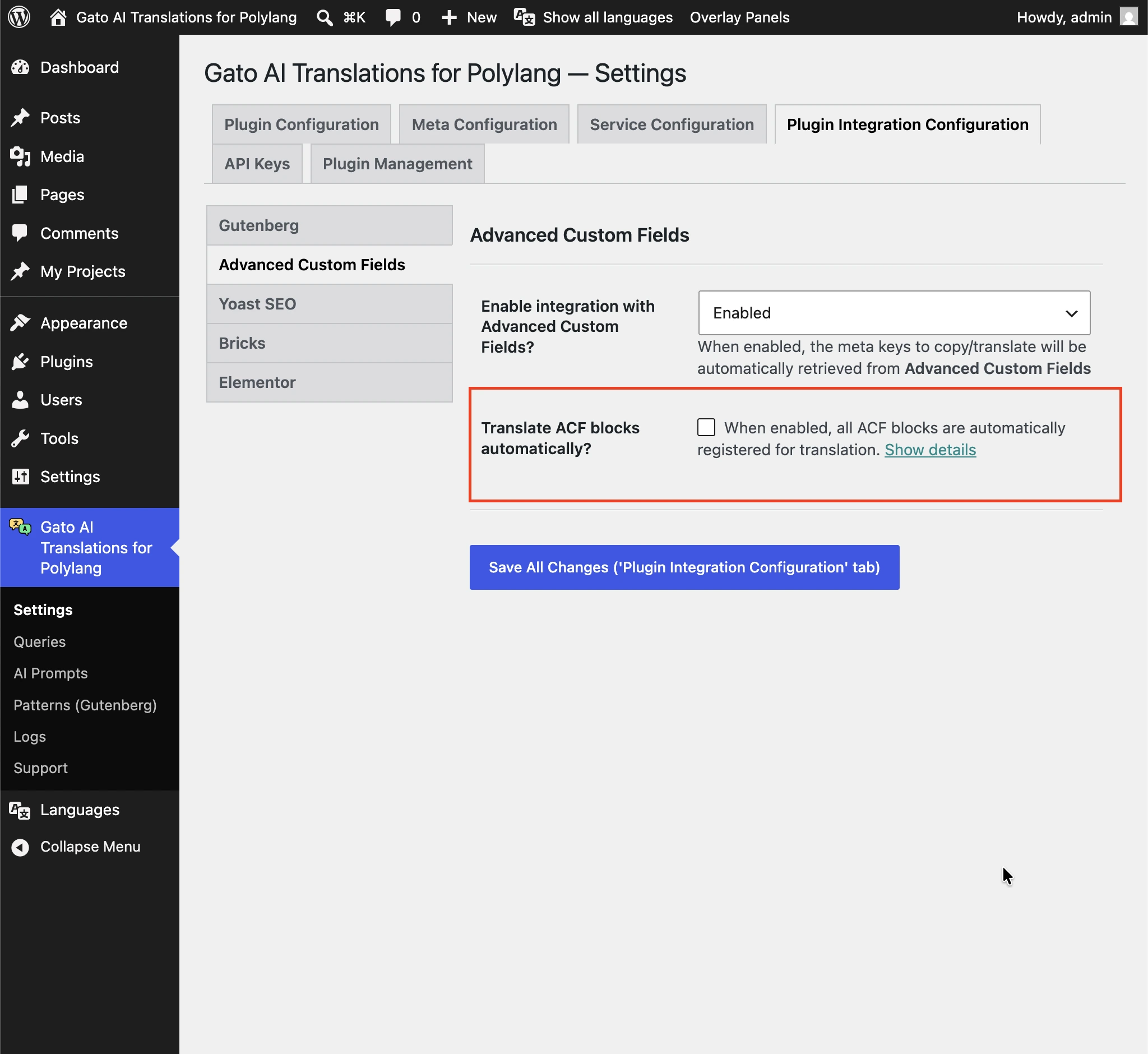
เมื่อเปิดใช้งาน ฟิลด์ string ที่แปลได้ทุกฟิลด์ในทุกบล็อก ACF จะถูกส่งไปแปล หากต้องการให้ฟิลด์ใดฟิลด์หนึ่งไม่ถูกแปล ให้ยกเว้นฟิลด์นั้นผ่าน hook acf/load_field ของ ACF มาตรฐาน โดยกำหนด gatompl เป็น 'skip':
// Disable translation for a single field by key
add_filter(
'acf/load_field/key=product_card_sku',
static function (array|false $field): array|false {
if (is_array($field)) {
$field['gatompl'] = 'skip';
}
return $field;
}
);
// Or disable several fields at once
add_filter(
'acf/load_field',
static function (array|false $field): array|false {
if (
is_array($field) && in_array($field['key'] ?? null, [
'product_card_feature_title',
'product_card_specs_dimensions',
'product_card_section_text_heading',
])
) {
$field['gatompl'] = 'skip';
}
return $field;
}
);2. ทีละฟิลด์ (ผ่านการตั้งค่า field group ของ ACF)
เมื่อกำหนด field group ด้วย acf_add_local_field_group() ให้เพิ่ม 'gatompl' => 'translate' โดยตรงในแต่ละฟิลด์ที่ต้องการแปล:
acf_add_local_field_group([
'key' => 'group_testimonial',
'title' => 'Testimonial Block',
'fields' => [
[
'key' => 'testimonial_text',
'label' => 'Testimonial',
'name' => 'testimonial',
'type' => 'textarea',
'gatompl' => 'translate',
],
[
'key' => 'testimonial_role',
'label' => 'Role',
'name' => 'role',
'type' => 'text',
// Option-array form — equivalent to `'gatompl' => 'translate'`,
// but leaves room for future plugin-side options on the same field
'gatompl' => [
'translation_configuration' => 'translate',
],
],
[
'key' => 'testimonial_featured_post',
'label' => 'Featured post',
'name' => 'featured_post',
'type' => 'post_object',
'post_type' => ['post'],
'return_format' => 'object',
'gatompl' => 'translate', // The referenced post ID is remapped to the target-language post
],
],
'location' => [
[
[
'param' => 'block',
'operator' => '==',
'value' => 'acf/testimonial',
],
],
],
]);วิธีนี้ใช้ได้กับฟิลด์ post_object, relationship, taxonomy, image, gallery และ repeater ด้วย: ปลั๊กอินจะติดตาม nested-repeater paths ได้ทุกระดับความลึก และ remap การอ้างอิง entity (posts, terms, media) ไปยังเวอร์ชันภาษาเป้าหมายที่สอดคล้องกัน
3. ทีละฟิลด์ (ผ่าน hook acf/load_field)
หากไม่สามารถแก้ไขการลงทะเบียน field group ได้ ให้เพิ่มฟิลด์เข้าผ่าน ACF hook เดียวกับที่ใช้ยกเว้นฟิลด์:
add_filter(
'acf/load_field/key=testimonial_text',
static function (array|false $field): array|false {
if (is_array($field)) {
$field['gatompl'] = 'translate';
}
return $field;
}
);การลงทะเบียนบล็อก ACF
สำหรับข้อมูลอ้างอิง นี่คือการลงทะเบียนบล็อกขั้นต่ำที่ใช้งานร่วมกับ field group ด้านบน (โดยใช้ acf_register_block_type จาก ACF PRO):
add_action('acf/init', function (): void {
if (!function_exists('acf_register_block_type')) {
return;
}
acf_register_block_type([
'name' => 'testimonial',
'title' => 'Testimonial',
'description' => 'A testimonial block.',
'render_template' => plugin_dir_path(__FILE__) . 'acf-blocks/testimonial/template.php',
'category' => 'widgets',
'icon' => 'format-quote',
'keywords' => ['testimonial', 'quote'],
'mode' => 'preview',
]);
});WPML Config
Gato AI Translations for Polylang อ่าน wpml-config.xml ที่มาพร้อมกับปลั๊กอินใดก็ตามโดยอัตโนมัติ และใช้ไฟล์นั้นเพื่อกำหนดว่าแอตทริบิวต์ของบล็อกใดที่แปลได้
การแจ้งเตือน Attempt Recovery
หลังการแปล บล็อกบางอันอาจแสดงการแจ้งเตือน Attempt Recovery ในตัวแก้ไข:
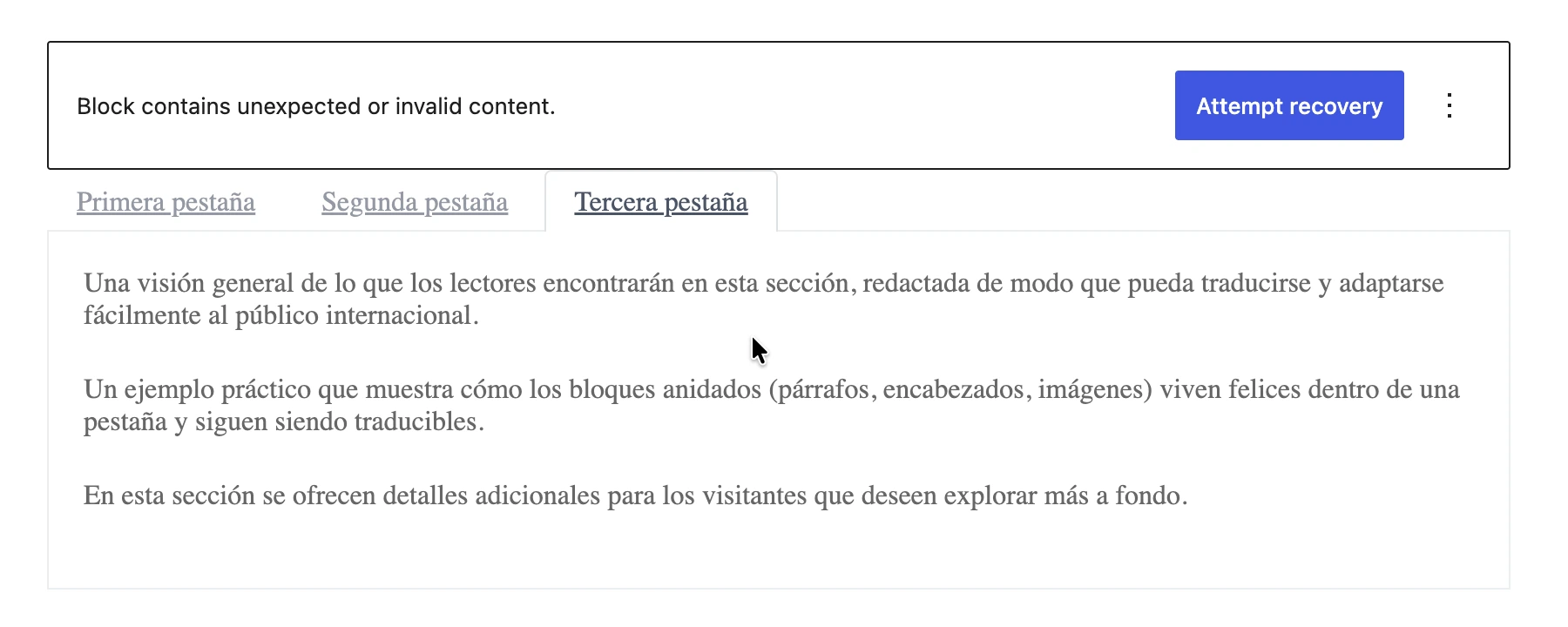
ดูรายละเอียดเพิ่มเติมที่ ทำไมบล็อกบางอันจึงต้องใช้ "Attempt Recovery" หลังการแปล?
การปิดใช้งานการแปลของคุณสมบัติเฉพาะ
หากต้องการปิดใช้งานการแปลคุณสมบัติเฉพาะ (หรือคุณสมบัติทั้งหมดของบล็อก) ที่กำหนดผ่าน wpml-config.xml ให้ return false จาก filter gatompl:use_wpml_config_for_block_type:
add_filter(
'gatompl:use_wpml_config_for_block_type',
static function (bool $enabled, string $blockTypeName, string $ruleKind): bool {
// Stop reading wpml-config.xml rules for greenshift-blocks/button
if ($blockTypeName === 'greenshift-blocks/button') {
return false;
}
return $enabled;
},
10,
3
);Kadence Blocks
บล็อกทั้งหมดจากปลั๊กอิน Kadence Blocks รองรับโดยอัตโนมัติ (ผ่าน wpml-config.xml ของพวกเขา)
บล็อกต่อไปนี้อาจแสดงผลได้ถูกต้องบน frontend หลังการแปล แต่จะแสดงการแจ้งเตือน Attempt Recovery เมื่อเปิดในตัวแก้ไข:
kadence/single-iconkadence/tabskadence/form
การคลิก Attempt Recovery จะสร้าง HTML ของบล็อกขึ้นใหม่ แต่เป็นตัวเลือก — ผลลัพธ์ที่แสดงบน frontend ถูกต้องอยู่แล้ว (อ่านรายละเอียด)
Greenshift Blocks
บล็อกทั้งหมดจาก Greenshift รองรับโดยอัตโนมัติ (ผ่าน wpml-config.xml ของพวกเขา)
โดยทั่วไป บล็อก Greenshift ที่แปลแล้วต้องคลิก Attempt Recovery ในตัวแก้ไขสำหรับแต่ละบล็อกเพื่อสร้าง HTML ขึ้นใหม่ (อ่านรายละเอียด)
GenerateBlocks
บล็อกจาก GenerateBlocks และ GenerateBlocks PRO:
- Container
- Grid
- Text
- Button
- Headline
- Image
- Query
- Shape
- Site Header
- Accordion
- Tabs
- Navigation
Yoast SEO
บล็อกเหล่านี้รองรับเฉพาะ string ธรรมดาเท่านั้น String ที่มี HTML tags (รวมถึงลิงก์, รูปภาพ, HTML styles เช่น strong หรือ italic, บรรทัดใหม่ ฯลฯ) ไม่ได้รับการรองรับ
อ่านคำแนะนำ บล็อก Gutenberg ทั้งหมดสามารถแปลได้หรือไม่? สำหรับข้อมูลเพิ่มเติม
บล็อกจาก Yoast SEO:
- Yoast How-to
- Yoast FAQ
การรองรับบล็อกเพิ่มเติม
คุณสามารถแปลบล็อกที่กำหนดเองจากแอปพลิเคชันของคุณ หรือบล็อกจากปลั๊กอินบุคคลที่สามได้
ดูคำแนะนำ การแปลบล็อก Gutenberg เพิ่มเติม สำหรับข้อมูลเพิ่มเติม
การแปล synced patterns
หน้า Appearance > Patterns เริ่มต้นของ WordPress ไม่รองรับการแปล synced patterns (หรือที่รู้จักในชื่อ reusable blocks) เนื่องจาก:
- Polylang ไม่เพิ่ม widget สำหรับเลือกภาษา (เฉพาะ Polylang PRO เท่านั้นที่รองรับ)
- ไม่มี Bulk Actions จึงไม่สามารถแปล patterns ที่มีอยู่ได้
ด้วยเหตุนี้ Gato AI Translations for Polylang จึงมีหน้า Patterns CPT มาตรฐาน ภายใต้รายการเมนู Patterns (Gutenberg) เพื่อเปิดใช้งานฟีเจอร์เหล่านี้
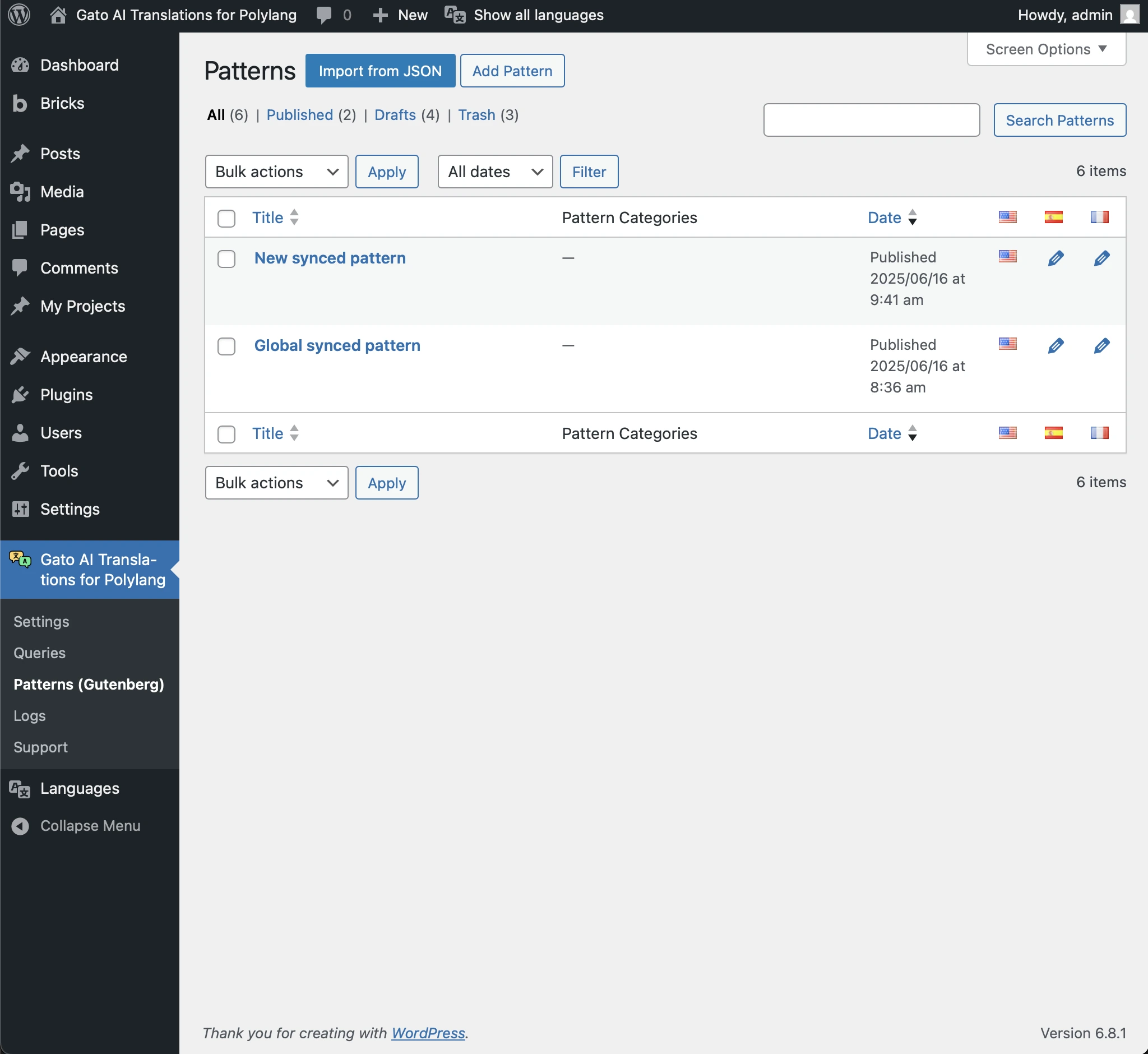
คุณสามารถแปล patterns จากหน้าจอนี้ได้ (คล้ายกับ CPT อื่น ๆ):
- แปล patterns ใหม่โดยอัตโนมัติเมื่อเผยแพร่ (จากหน้าจอ Add Pattern)
- แปล patterns ที่มีอยู่ด้วยตนเองโดยใช้ Bulk Actions
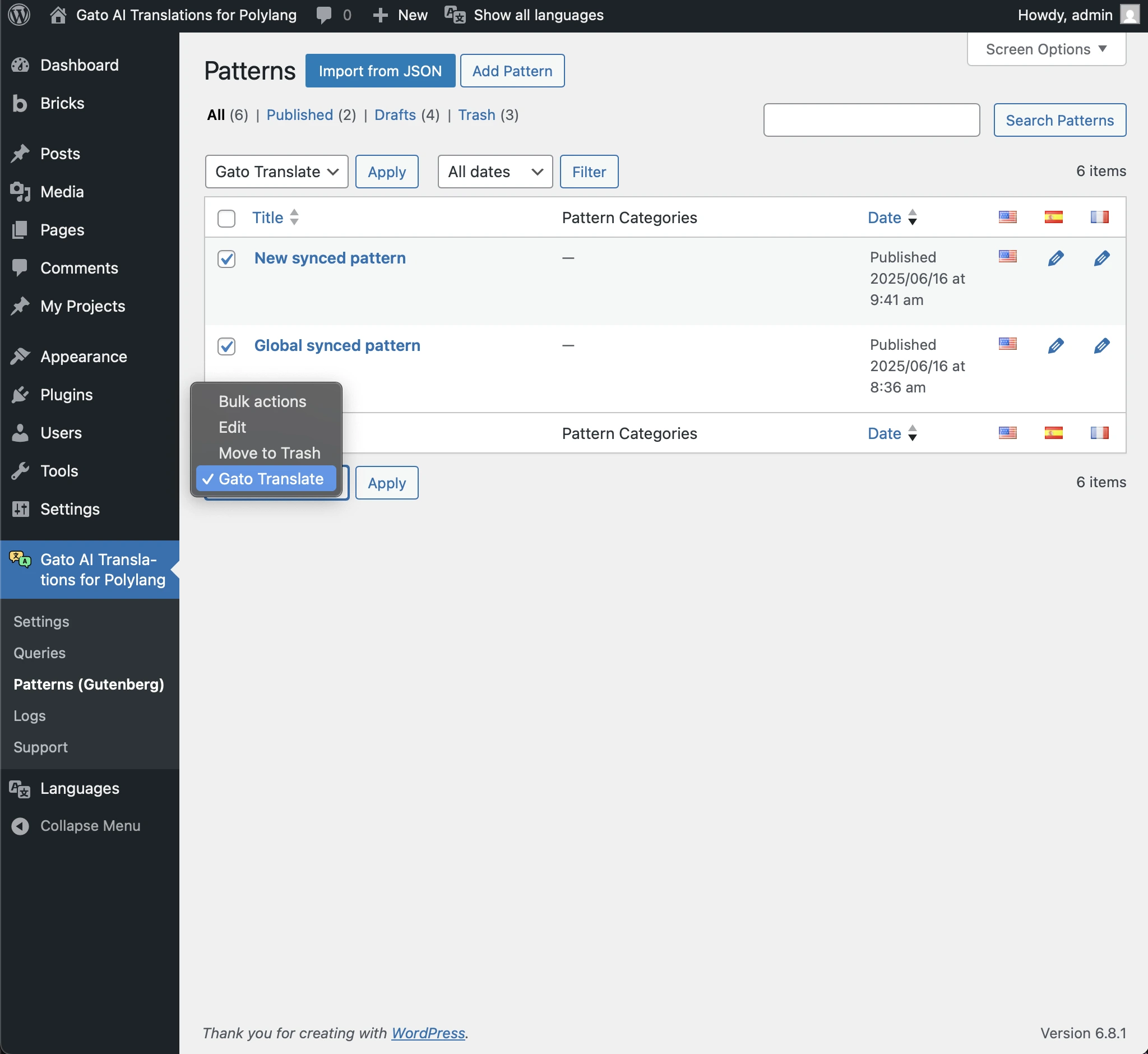
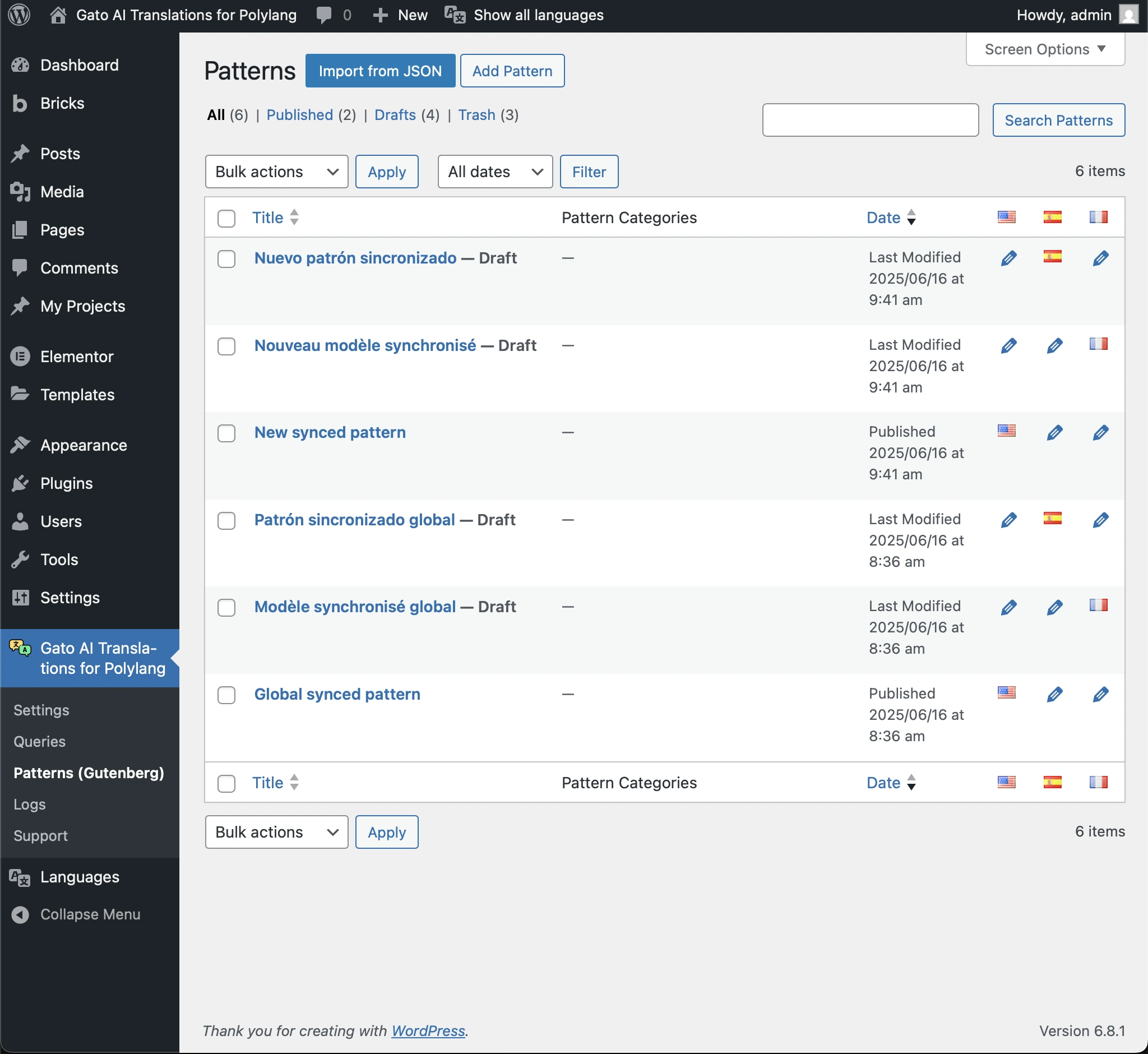
หน้าจอนี้จะแสดง patterns ที่แปลแล้วด้วย:
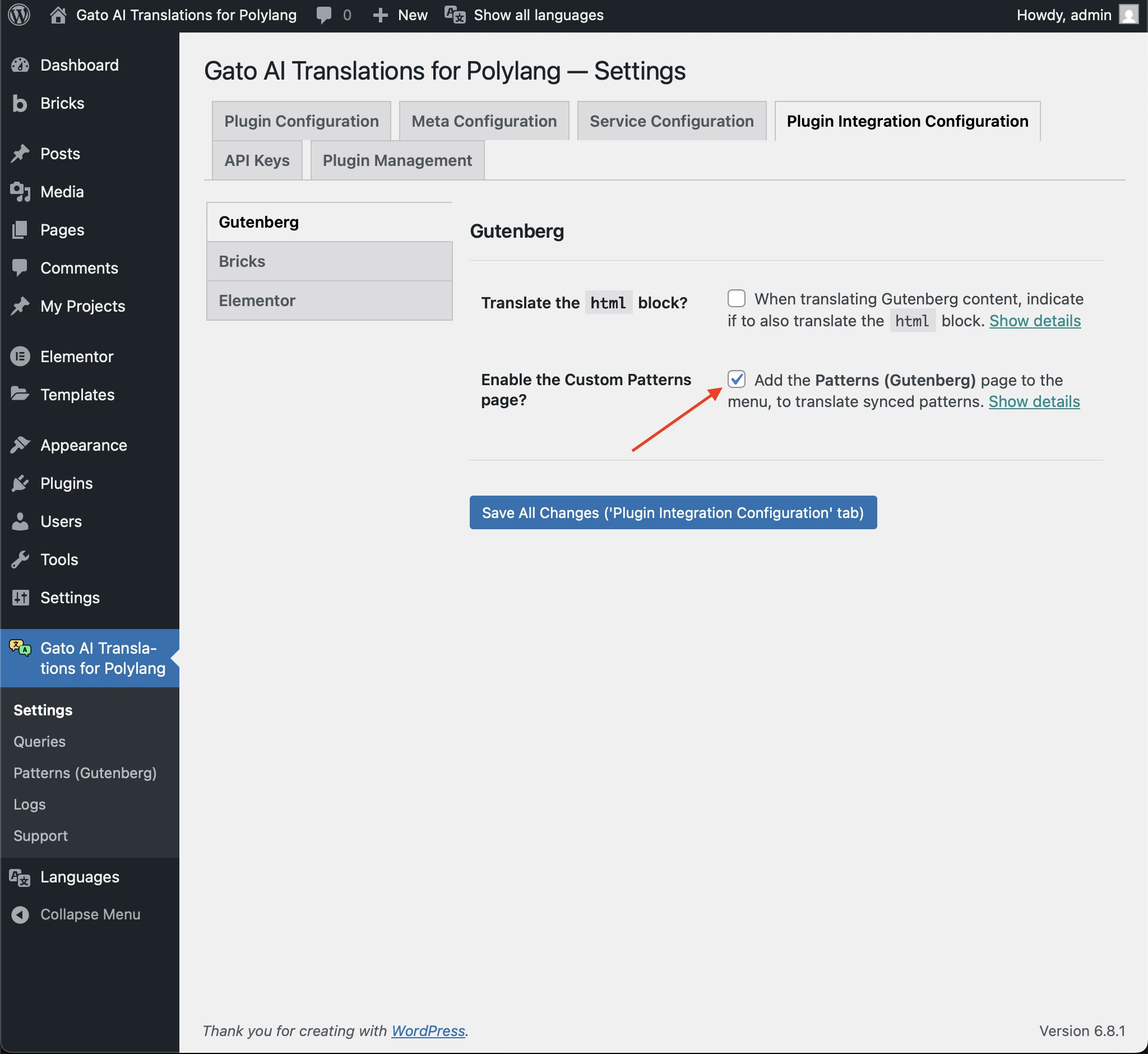
การปิดใช้งานหน้า Patterns แบบกำหนดเอง
คุณสามารถปิดใช้งานการแสดงหน้า Patterns (Gutenberg) ในเมนูได้
ในการทำเช่นนั้น ไปที่ Settings ใต้ Plugin Integration Configuration > Gutenberg แล้วยกเลิกการเลือก checkbox Enable the Custom Patterns page