

การรันการแปลแบบกลุ่มโดยใช้ WP-CLI
คุณสามารถรันการแปลแบบกลุ่มโดยใช้ WP-CLI ร่วมกับ bash scripts ซึ่งช่วยให้คุณสามารถรันการแปลในเบื้องหลังได้ขณะที่คุณกำลังทำงานอื่น
เพื่อดำเนินการนี้ ให้สร้าง bash scripts สองไฟล์:
- สคริปต์หลักที่มีตรรกะในการประมวลผลแบบกลุ่ม (ไม่ต้องเปลี่ยนแปลง)
- ไฟล์การตั้งค่าที่กำหนดรายการที่จะแปล (อัปเดตในแต่ละครั้งที่รันการแปล)
สคริปต์หลัก
สร้างไฟล์ชื่อ gatotranslate.sh (ดาวน์โหลดตัวอย่าง) ที่มีตรรกะสำหรับประมวลผลการแปล:
คุณสามารถปรับแต่งพารามิเตอร์ที่ส่งให้คำสั่ง gatotranslate ได้ (เช่น: --status-to-update=draft, --status-when-translated=same-as-origin, --parts=properties เป็นต้น)
#!/bin/bash
# ------------------------------------------------------------------------------------------------
# Load configuration
# ------------------------------------------------------------------------------------------------
SCRIPT_DIR="$(cd "$(dirname "${BASH_SOURCE[0]}")" && pwd)"
source "${SCRIPT_DIR}/gatotranslate.config.sh"
# ------------------------------------------------------------------------------------------------
# Arguments
# ------------------------------------------------------------------------------------------------
# (Optional) Provide the start batch number as an argument, default is 1
start_batch=${1:-1}
# ------------------------------------------------------------------------------------------------
# Logic
# ------------------------------------------------------------------------------------------------
batch_size=${batch_size:-1} # If not provided, default to 1
total_items=${#items[@]}
total_batches=$(((total_items + batch_size - 1) / batch_size))
start_batch_index=$(((start_batch - 1) * batch_size))
echo "----------------------------------------"
echo "Translating $subcommand items"
echo "----------------------------------------"
echo "Batch size: $batch_size"
echo "Total items: $total_items"
echo "Total batches: $total_batches"
echo "Starting from batch number: $start_batch"
echo "----------------------------------------"
for ((start=start_batch_index; start<total_items; start+=batch_size)); do
# Get the next batch of items
batch=("${items[@]:$start:$batch_size}")
echo "Processing batch #$((start/batch_size + 1))"
# Pass all items in the batch as separate arguments
cmd=$(printf 'wp gatotranslate %s "%s" --status-to-update=any --user=%s' "$subcommand" "${batch[*]}" "$user")
echo "Command: $cmd"
eval $cmd
exit_code=$?
if [ $exit_code -ne 0 ]; then
echo -e "\a\a\a\a\a"
exit 1
fi
done
# Finished successfully
echo -e "\a"
echo "----------------------------------------"
echo "Finished successfully 👏"
echo "----------------------------------------"ไฟล์การตั้งค่า
สร้างไฟล์ชื่อ gatotranslate.config.sh (ดาวน์โหลดตัวอย่าง) ที่มีการตั้งค่าสำหรับการแปลแบบกลุ่ม:
user="admin"
subcommand="post"
batch_size=1
items=(
4118
4117
4116
3739
)ไฟล์นี้ต้องประกอบด้วยตัวแปรดังต่อไปนี้:
| ตัวแปร | คำอธิบาย |
|---|---|
user | ชื่อผู้ใช้ WordPress สำหรับรันคำสั่ง (โดยทั่วไปคือ admin) |
subcommand | subcommand WP-CLI ของ gatotranslate ที่จะรัน (post, media, term หรือ menu) |
batch_size | จำนวนรายการที่จะแปลในแต่ละกลุ่ม (ค่าเริ่มต้นคือ 1) |
items | อาร์เรย์ของ ID รายการที่จะแปล (โพสต์, แท็ก, หมวดหมู่, มีเดีย, เมนู ฯลฯ) |
การรันสคริปต์
รันจากไดเรกทอรีรากของ WordPress ที่มีคำสั่ง wp ให้ใช้งาน
เพื่อรันการแปลแบบกลุ่ม ให้รัน:
bash +x gatotranslate.shสคริปต์จะรันคำสั่ง gatotranslate สำหรับทุกรายการ ในกลุ่มตามขนาดที่กำหนด พร้อมแสดงข้อมูลความคืบหน้าของแต่ละกลุ่ม
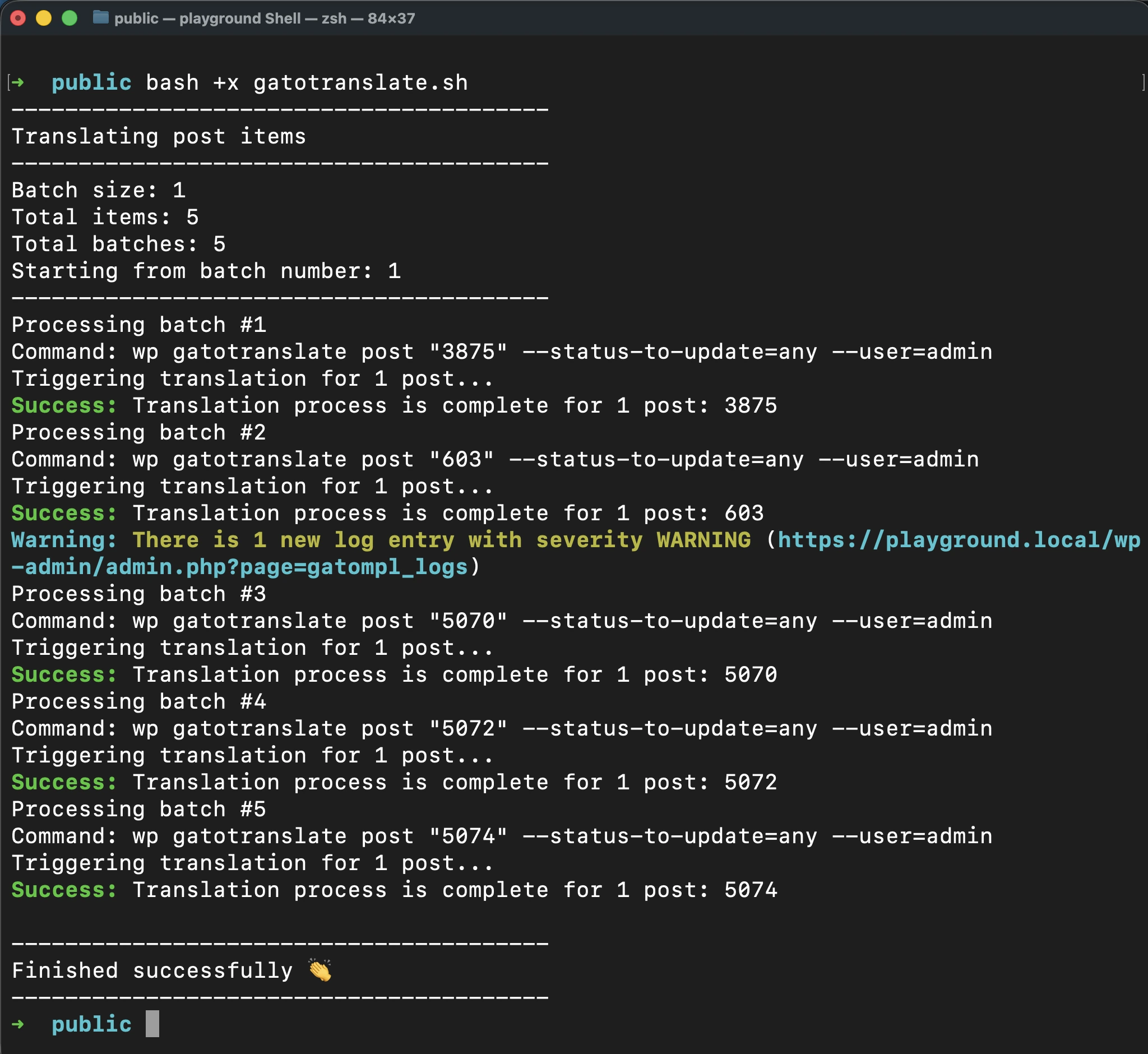
เมื่อสคริปต์ทำงานเสร็จสิ้นสำเร็จ จะมีเสียงบี๊ปหนึ่งครั้ง
การหยุดการทำงานเมื่อเกิดข้อผิดพลาด
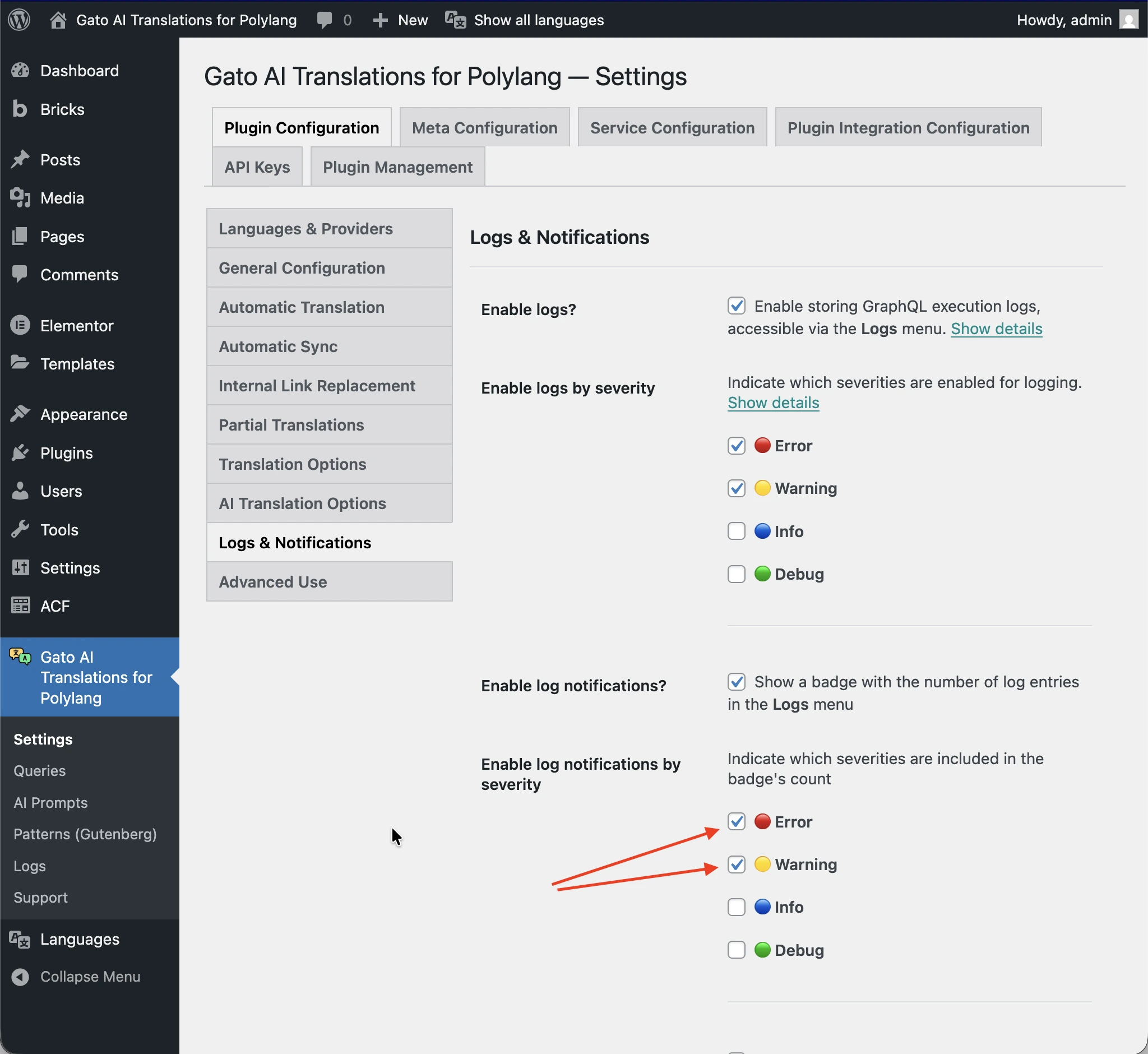
เพื่อให้สคริปต์หยุดทำงานโดยอัตโนมัติเมื่อมีข้อผิดพลาดหรือคำเตือนถูกเพิ่มลงในบันทึก ให้เพิ่มพารามิเตอร์ --fail-if-log-notifications ลงในคำสั่งใน gatotranslate.sh:
cmd=$(printf 'wp gatotranslate %s "%s" --fail-if-log-notifications --status-to-update=any --user=%s' "$subcommand" "${batch[*]}" "$user")ระดับความรุนแรงของการแจ้งเตือนบันทึกที่จะทำให้สคริปต์หยุดทำงาน คือระดับที่ตั้งค่าไว้ในหน้า Settings > Plugin Configuration > Logs & Notifications
เมื่อสคริปต์หยุดทำงานเนื่องจากการแจ้งเตือนบันทึก จะมีเสียงบี๊ปยาวต่อเนื่อง
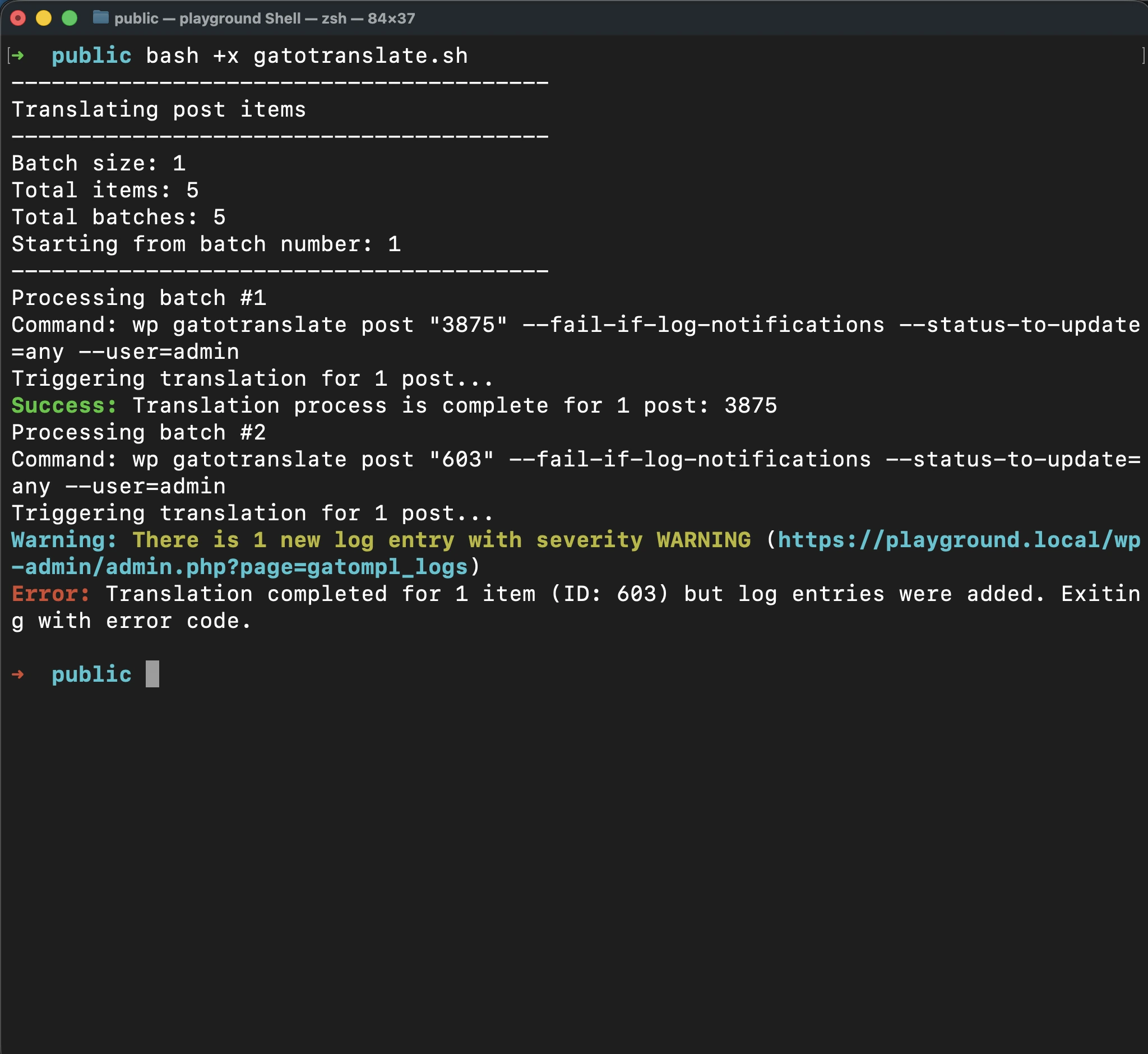
หลังจากแก้ไขปัญหาแล้ว คุณสามารถดำเนินการแปลต่อจากจุดที่ล้มเหลวได้โดยส่งหมายเลขกลุ่มเป็นอาร์กิวเมนต์
วิธีนี้ช่วยให้คุณหลีกเลี่ยงการประมวลผลรายการที่ได้รับการแปลสำเร็จแล้วซ้ำ ประหยัดทั้งเวลาและเครดิต API
ตัวอย่างเช่น หากความล้มเหลวเกิดขึ้นที่กลุ่ม 2 หลังจากแก้ไขปัญหาแล้ว ให้รัน:
bash +x gatotranslate.sh 2ขั้นสูง: การดึง ID ของรายการที่จะแปล
เมื่อตั้งค่าการแปลแบบกลุ่ม คุณต้องทราบ ID ของรายการที่จะแปล
เนื่องจากปลั๊กอินรัน Gato GraphQL ภายใต้ฝาครอบ เราจึงสามารถรัน GraphQL query เพื่อดึงข้อมูลนี้ได้อย่างสะดวก
เพื่อรัน GraphQL queries คุณต้องเปิดใช้งาน Advanced Mode ก่อนและเข้าถึง Queries CPT ดู การสร้าง Helper Queries สำหรับคำแนะนำในการเปิดใช้งาน Advanced Mode
เพิ่มรายการ Queries ใหม่ โดยตั้งชื่อว่า Retrieve item IDs และใส่ GraphQL query ดังต่อไปนี้:
query RetrieveIDsForCustomPosts {
customPosts(
filter: {
#########################################################
### Configure which CPTs to retrieve ###
customPostTypes: [ "post", "page" ],
#########################################################
polylangLanguagesBy: { predefined: DEFAULT }
},
pagination: { limit: -1 },
sort: { by: DATE, order: DESC }
) @export(as: "ids") {
id
title
customPostType
}
compiledData: self {
ids: _arrayJoin( array: $ids, separator: " " )
}
}
query RetrieveIDsForCategories {
categories(
#########################################################
### Configure which taxonomy to retrieve ###
taxonomy: "category",
#########################################################
filter: { polylangLanguagesBy: { predefined: DEFAULT } },
pagination: { limit: -1 },
sort: { by: NAME, order: DESC }
) @export(as: "ids") {
id
name
taxonomy
}
compiledData: self {
ids: _arrayJoin( array: $ids, separator: " " )
}
}
query RetrieveIDsForTags {
tags(
#########################################################
### Configure which taxonomy to retrieve ###
taxonomy: "post_tag",
#########################################################
filter: { polylangLanguagesBy: { predefined: DEFAULT } },
pagination: { limit: -1 },
sort: { by: NAME, order: DESC }
) @export(as: "ids") {
id
name
taxonomy
}
compiledData: self {
ids: _arrayJoin( array: $ids, separator: " " )
}
}
query RetrieveIDsForMedia {
mediaItems(
filter: { polylangLanguagesBy: { predefined: DEFAULT } },
pagination: { limit: -1 },
sort: { by: DATE, order: DESC }
) @export(as: "ids") {
id
title
}
compiledData: self {
ids: _arrayJoin( array: $ids, separator: " " )
}
}
#################################################################################################
# Watch out: This will bring all menus, not just the ones in the origin language.
# Translated menus are those with a location containing the "___" string,
# e.g.: "header___es", "footer___fr", etc.
#################################################################################################
query RetrieveIDsForMenus {
menus(
pagination: { limit: -1 },
sort: { by: NAME, order: DESC }
) @export(as: "ids") {
id
name
locations
}
compiledData: self {
ids: _arrayJoin( array: $ids, separator: " " )
}
}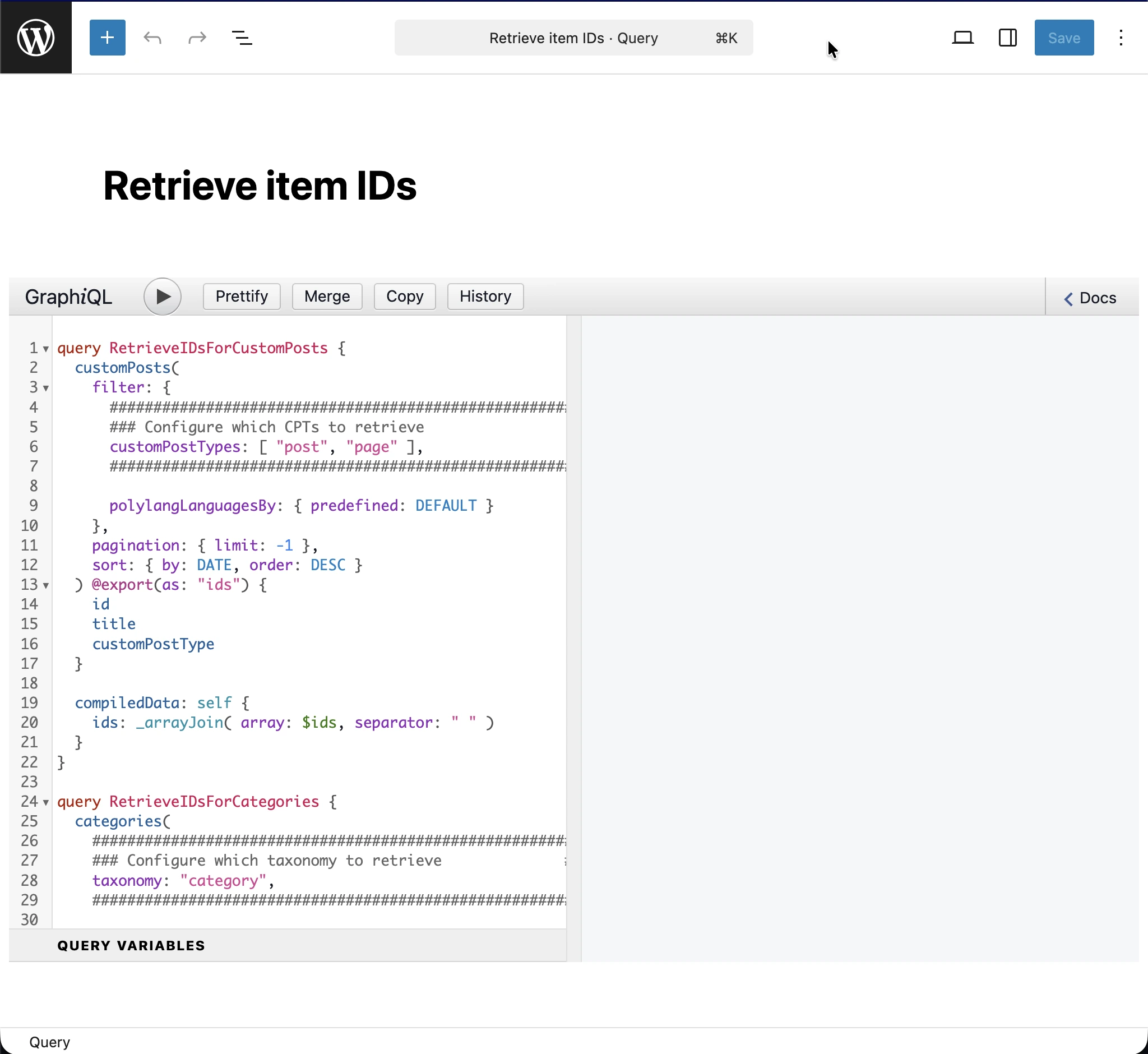
ขึ้นอยู่กับว่าคุณต้องการแปลรายการประเภทใด คุณจะต้องตั้งค่าและรัน operation ที่สอดคล้องกันใน query
ตัวอย่างเช่น เพื่อดึง ID ของหมวดหมู่โพสต์ คุณต้องรัน operation RetrieveIDsForCategories โดยส่ง taxonomy category เป็นอาร์กิวเมนต์:
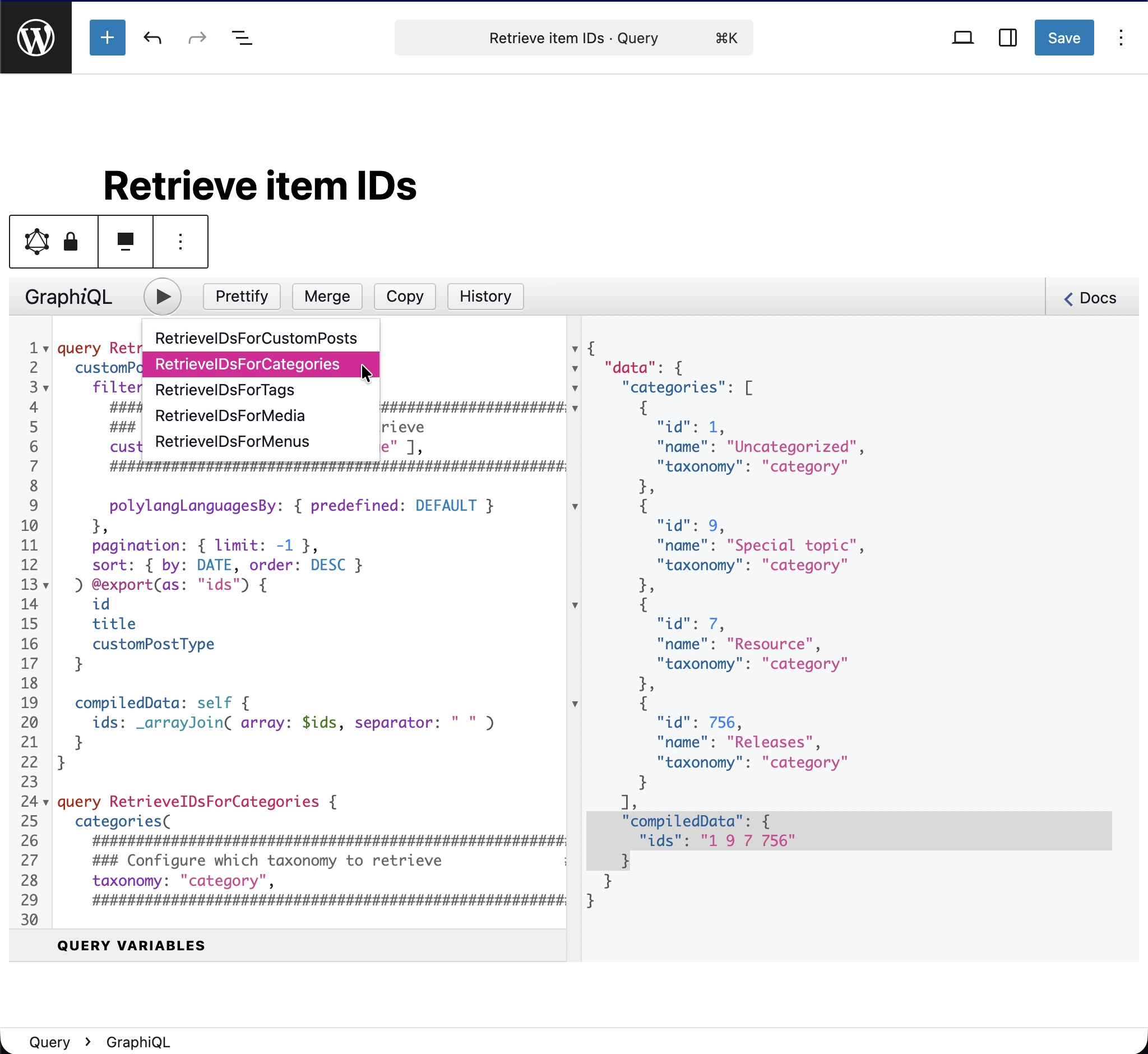
จาก JSON response ID ของรายการที่จะแปลจะปรากฏอยู่ในรายการ data.compiledData.ids (ไฮไลต์ในภาพ) คัดลอกสตริงนั้นและเก็บไว้ในอาร์เรย์ items ในไฟล์การตั้งค่า